
Clipping is one of the few online side hustles where a brand-new account with zero followers can get paid from its very first post. You cut short clips from a creator's or brand's long videos, post them on your own accounts, and earn for every 1,000 views through  Whop's Content Rewards marketplace.
It's also a side hustle where most beginners quit in their first week. Content Rewards' own data says only 4.85% of first-time submitters earn money on their very first clip. Usually it's not because clipping doesn't work. It's because of a few avoidable mistakes: posting on a brand-new account straight away, missing a rule in the brief, submitting too late, or joining a campaign whose budget is already almost gone.
This guide shows you how to start clipping on Whop the right way, step by step, using Content Rewards' own rules and real campaigns that were live this week. For the money side in detail, including fees, caps and what clippers actually earn, see our companion post on Whop clipping pay rates.
How to Start Clipping on Whop: Quick Answer
Create a free
Whop account and add a payout method.Set up dedicated social accounts for clipping, separate from your personal ones.
Warm those accounts up for several days before posting any clips.
Link your accounts in Content Rewards and join a campaign.
Pick a campaign with a good rate and plenty of budget per clipper.
Read the brief line by line, including the disclosure rules.
Make your clip, post it, and submit the link within 30 minutes.
What Whop Clipping Actually Is
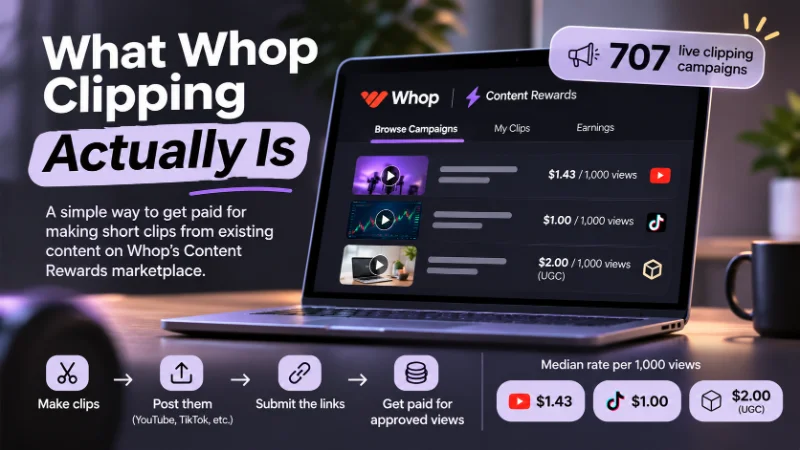
Brands and creators fund campaigns on Content Rewards, a marketplace that runs on Whop. Each campaign sets a rate per 1,000 views, a minimum and maximum payout per clip, and a list of rules. You make clips, post them, submit the links, and get paid for approved views until the budget runs out.
The scale is real. According to Content Rewards, there were 707 live clipping campaigns on November 10, 2026, with a median rate of about $1.09 per 1,000 views.  YouTube clipping campaigns paid a median of $1.43,
 TikTok campaigns $1.00, and UGC campaigns, where you create original content about a brand, $2.00. Even finance YouTuber Mark Tilbury has pointed his audience to Content Rewards, which our Mark Tilbury net worth breakdown covers.
Whop is also in the spotlight right now.  Iman Gadzhi is a co-owner of the platform, and his free AI Income Challenge has pushed a lot of new people toward Whop this month. He also just bought into AI video company Higgsfield, which we break down in Iman Gadzhi's Higgsfield investment. You don't need any challenge or course to start clipping, though. Everything below is free.
What You Need to Start
What | Details | Cost |
|---|---|---|
A phone or computer | A phone is enough to start | $0 |
An editing app | A free app like | $0 |
Social accounts | One to three fresh accounts on | $0 |
A | Free to create, plus a payout method | $0 |
Time | About one to two hours a day once you get going | Your time |
No followers, no camera and no face required. You're editing other people's content, not filming your own.
Step 1: Create Your Whop Account and Add a Payout Method
Sign up for a free Whop account, then set up where your money goes before you earn anything. According to Whop's payout docs, you add one under Dashboard, then Balances, then Payout methods. Whop supports bank accounts, mobile wallets and crypto wallets in more than 200 countries.
Two things to know early. If you're outside the US, you need a bank account in your registered country's currency. And standard payouts take up to five business days, while instant payouts are faster but cost a fee.
Step 2: Set Up Dedicated Clipping Accounts
Don't clip from your personal account. Clipping means posting a lot of content in one niche, which buries anything personal and confuses the algorithm about who your audience is.
Instead, create one to three fresh accounts on the platforms you plan to use. Pick a clear niche for each, such as a podcast, a streamer, a game or a business creator. Give each account a simple name and a matching bio, and keep every account public. Content Rewards doesn't accept submissions from private accounts.
Step 3: Warm Up Your Accounts Before Posting (Don't Skip This)
This is the step most beginners skip, and the one that costs them the most. A brand-new account that immediately starts posting clips often looks like a bot. Clipping tool makers like Ssemble and Cut.pro describe the same pattern: those accounts get quietly suppressed, and clips sit at almost zero views.
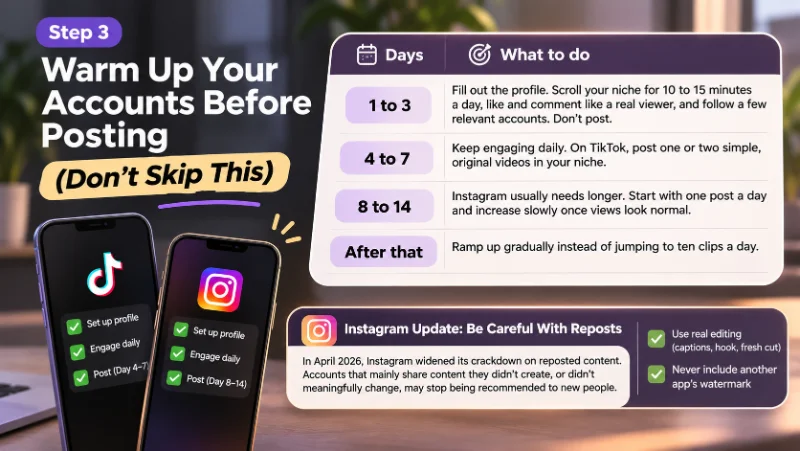
To be fair, TikTok and  instagram don't publish official warm-up rules, and these companies sell clipping tools, so take their advice as practical experience rather than proven fact. Warming up costs nothing and takes a few minutes a day, though, so it's not worth the risk. Here's the plan we suggest, based on what those guides recommend:
Days | What to do |
|---|---|
1 to 3 | Fill out the profile. Scroll your niche for 10 to 15 minutes a day, like and comment like a real viewer, and follow a few relevant accounts. Don't post. |
4 to 7 | Keep engaging daily. On TikTok, post one or two simple, original videos in your niche. |
8 to 14 | Instagram usually needs longer. Start with one post a day and increase slowly once views look normal. |
After that | Ramp up gradually instead of jumping to ten clips a day. |
Instagram deserves extra care. In April 2026, Instagram widened its crackdown on reposted content: accounts that mainly share content they didn't create, or didn't meaningfully change, may stop being recommended to people who don't already follow them. For clippers, every clip needs real editing, such as captions, a strong hook and a fresh cut, and never another app's watermark.
Step 4: Link Your Accounts and Join a Campaign
Content Rewards' official start-here tutorial lays out the flow:
In your Content Rewards dashboard, open your avatar menu, go to Linked Accounts, and use Add Account to connect each platform. Linking proves the videos you submit are really yours.
Open Discover Campaigns from the left sidebar to see every live campaign.
Open a campaign and join the brand's
Whop when the pop-up asks.Open the Content Rewards app in that Whop's right-hand sidebar and select your campaign.
Link accounts before you post anything. Some campaigns can only verify views from accounts that were connected when the clip went live.
Step 5: Choose Your First Campaign
This is where most of your earnings are won or lost. Check these five things on every campaign page:
Check | Why it matters |
|---|---|
Rate per 1,000 views | Your pay per view. Rates often differ by platform within the same campaign. |
Budget remaining | Content Rewards can close a campaign to new submissions once 90% of its budget is used, under its clipper terms. |
Minimum payout | What a clip must earn before it's even reviewed. At $2.50 per 1,000 views and a $7.50 minimum, you need 3,000 views. |
Maximum payout | The most one clip can earn. A viral clip stops earning at the cap. |
Platforms and location | Each campaign lists accepted platforms, and some have country restrictions. |
Reading real campaigns: what we saw on November 11, 2026
Here are five campaigns that were listed on Content Rewards' Discover page when we checked. The last column is our own rough rule of thumb: remaining budget divided by the number of clippers, which shows how much money is realistically up for grabs per person.
Campaign | Rate per 1K views | Budget left | Clippers | Left per clipper | Our take |
|---|---|---|---|---|---|
About $27,300 of $40,000 | 126 | About $217 | Strong pick. Good rate, fresh budget, $5 minimum | ||
MoorHouse Media Network | $2.50, max $250 per clip | About $670 of $1,719 | 20 | About $33 | Good rate, but a small pot |
Boxabl Official Clipping | $0.50 | About $62,200 of $85,000 | 899 | About $69 | Big budget, but low pay and crowded |
Split-Screen UGC (Non-English) | $1.00 | About $6,400 of $77,400 | 425 | About $15 | Skip. Over 90% used, so it can close any time |
Preme Club Livestream | $1.00 | About $500 of $2,000 | 335 | About $1.50 | Skip. Hundreds of clippers chasing $500 |
The lesson: the headline rate isn't enough. A fresh campaign with a fair rate and room per clipper beats a crowded one, even if the crowded one pays a little more per view. New campaigns fill up fast, so check Discover regularly.
Step 6: Read the Brief Like a Contract
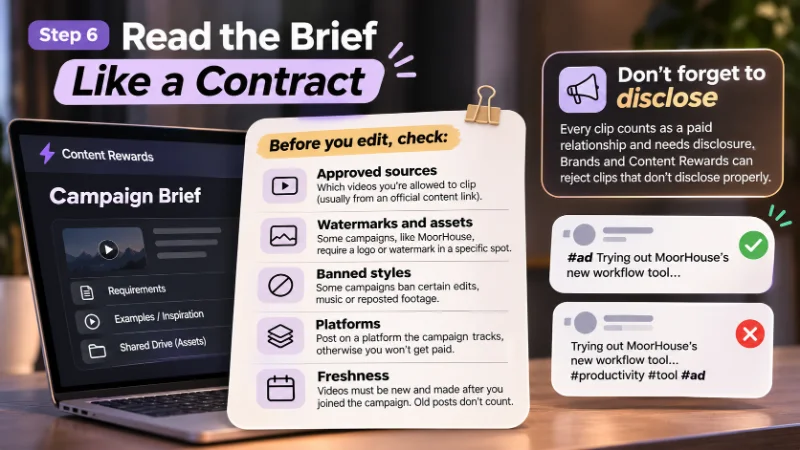
A clip with a million views earns nothing if it breaks the brief. The good news is that under Content Rewards' clipper terms, brands can only reject clips for requirements written in the campaign. The tutorial also tells you to check linked examples, inspiration content and shared drive folders, which is often where the real rules live. Before you edit anything, check:
Approved sources: which videos you're allowed to clip, usually from an official content link.
Watermarks and assets: some campaigns, like MoorHouse, require a logo or watermark in a specific spot.
Banned styles: some campaigns ban certain edits, music or reposted footage.
Platforms: posting to a platform the campaign doesn't track means no pay.
Freshness: videos must be new and made after you joined the campaign. Old posts don't count.
Don't forget to disclose
This is the rule most clippers miss. Content Rewards' FTC compliance terms say that every clip posted for a campaign counts as a paid relationship that needs disclosure, because you're paid on performance. Brands and Content Rewards can reject clips that don't disclose properly.
In practice, that means putting "#ad" or "Sponsored" at the start of your caption, or using the platform's own paid partnership or branded content label. Don't bury #ad in a string of hashtags at the end. The FTC's guidance is that viewers should see the disclosure without having to look for it.
Step 7: Make Your First Clip
You don't need fancy editing. Most clips that get paid follow the same simple formula:
Find the moment. Look for a strong opinion, a surprising fact, a funny exchange or an emotional story. If it doesn't grab you in the first two seconds, it won't grab anyone.
Cut tight. Most clips land between 15 and 60 seconds. Start on the hook, not the build-up.
Format for mobile. Use a vertical 9:16 frame. Add bold captions of two to four words per line, placed above the bottom of the screen where the app's buttons sit, since many people watch on mute.
Add a text hook. Put one short line at the top that makes people stay.
Text hooks don't need to be clever. They need to create a question. For example:
Clip type | Example text hook |
|---|---|
Business podcast | "This is why most people never get rich" |
Gaming trailer | "Nobody noticed this in the new trailer" |
Streamer reaction | "He did NOT expect that answer" |
Interview | "The question that made her walk out" |
Only use a hook the clip actually delivers on. Misleading hooks hurt retention and can get clips rejected.
 CapCut is enough for all of this. Once you're comfortable, AI clipping tools like
 OpusClip or
 Submagic AI can find highlights and add captions faster, but always check their picks. AI is good at finding clips and bad at knowing which ones are actually interesting.
Step 8: Post and Submit Within 30 Minutes
Timing is a hard rule, not a tip. Content Rewards' tutorial says videos must be submitted within 30 minutes of going live to be eligible, and older videos are rejected automatically. Individual campaign briefs repeat the same rule.
So post, then immediately open the campaign, click Submit, paste your post link, add a title, and click "Submit it for approval." You can follow its progress in the My Submissions tab.
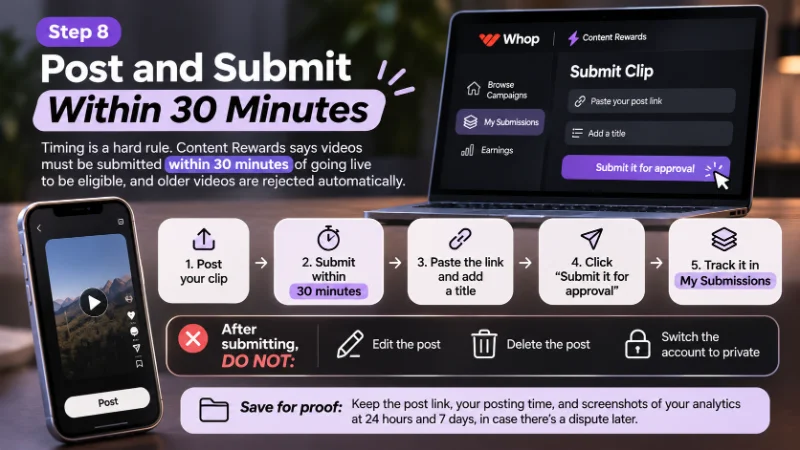
After submitting, leave the post alone. Don't edit it, delete it, or switch the account to private, because any of those can get the clip rejected. It's also smart to save the link, your posting time and screenshots of your analytics at 24 hours and 7 days, in case there's a dispute later.
Step 9: Get Paid
Once a clip earns enough to pass the campaign's minimum, it goes into review. Most submissions are reviewed within a few days. Approved earnings go to your Whop balance, and according to the Content Rewards FAQ, you request payouts manually, at most once every three days per submission.
Content Rewards takes a cut. Its help center currently lists a 7% fee, while its payouts guide and several reviews say 10%, so check the terms when you join. Our pay rates breakdown shows what different view counts pay after fees.
A quick reality check: at $1 per 1,000 views with a 10% fee, 100,000 approved views pays about $90. Clippers who earn real money post consistently across several accounts and campaigns instead of waiting for one viral hit.
What Real Clippers Report
Content Rewards' academy page features testimonials like "$11,000 net profit in 30 days." Treat those as the very top end. The public record from ordinary clippers is more mixed:
Low payouts on big clips. In a July 2026 r/whop post, reported by Forkoff, a clipper said they were paid just $2 on a 400,000-view video in an Ali Siddiq campaign, with the payout stuck on "Estimated" while support passed the case between
Whop and Content Rewards.Speed beats quality. A widely discussed September 2026 r/whop thread, summarized by Sprites, argued that the newer campaign system rewards whoever claims budget first, and that clips can't be resubmitted later because of the 30-minute rule.
Side income, not a salary. In a July 2026 thread, a clipper with almost a year of experience described it as "ok for extra $."
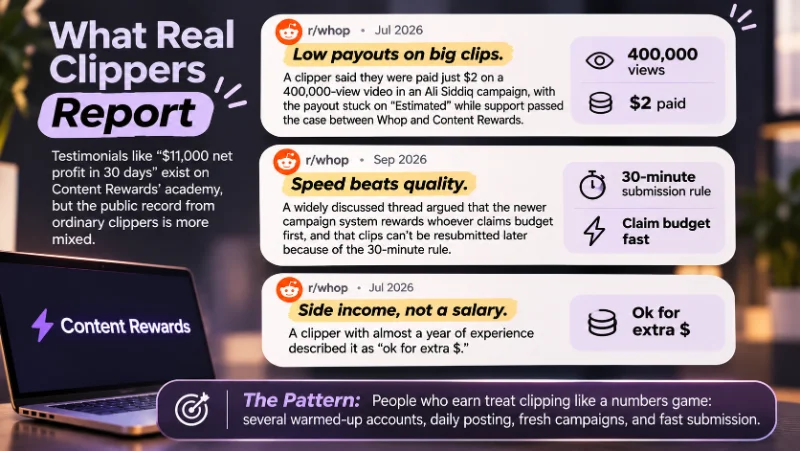
The pattern is clear. People who earn treat clipping like a numbers game: several warmed-up accounts, daily posting, fresh campaigns, and fast submission.
8 Beginner Mistakes That Cost You Money
Mistake | What happens | The fix |
|---|---|---|
Posting on a brand-new account | Clips get suppressed and sit at near-zero views | Warm the account up first |
Straight reposts with no edits |
| Add hooks, captions and a fresh cut |
Skipping the brief and its files | The clip is rejected, even with lots of views | Read every requirement and linked document |
No ad disclosure | The clip can be rejected | Put #ad at the start or use the paid partnership label |
Joining drained or crowded campaigns | Your views never get paid | Check budget left per clipper |
Submitting late | Automatic rejection after 30 minutes | Submit right after posting |
Editing or deleting after submitting | The clip can be rejected | Leave posts untouched |
Buying views or using bots | Flags, rejection and a lower Trust Score | Only use real, organic views |
That last one matters more than it looks. Content Rewards gives every submission a bot score, and its terms say rejected submissions and high bot scores lower your Trust Score, which affects how your future clips are reviewed.
Is Whop Clipping Right for You?
Clipping suits you if you're comfortable with short-form apps, can spend an hour or two a day, and don't mind small, steady earnings while you learn what goes viral. It's a great way to build editing skills and understand the algorithm with zero upfront cost.
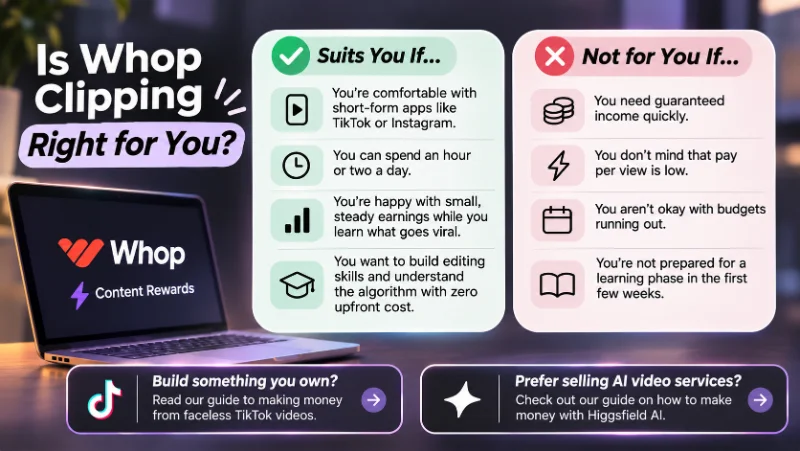
It's not for you if you need guaranteed income quickly. Pay per view is low, budgets run out, and the first few weeks are mostly learning. If you'd rather build something you own, our guide to making money from faceless TikTok videos covers routes like affiliate marketing and selling digital products. And if you'd rather sell AI video services than post for views, see our guide on how to make money with Higgsfield AI.
FAQ
Do you need followers to start clipping on Whop?
No. Content Rewards has no follower minimum, and brands pay for views, not followers. A brand-new account can earn from its first approved clip, as long as it's warmed up and follows the brief.
Do you need to show your face?
No. Clipping means editing existing videos from creators and brands, so you never appear on camera.
Is Whop clipping free to start?
Yes. Whop accounts and Content Rewards campaigns are free to join, and a free editing app like CapCut is enough. Content Rewards takes a percentage of what you earn, and some withdrawal methods charge a fee.
Do I have to label clips as ads?
Yes. Content Rewards' FTC terms treat every campaign clip as paid content that needs disclosure. Put #ad or "Sponsored" at the start of your caption, or use the platform's paid partnership label.
How long does it take to get your first payout?
Plan for one to three weeks. Warm-up takes up to two weeks, a clip has to pass the campaign's minimum before review, and reviews usually take a few days.
Can a clip be rejected after it gets views?
Yes, if it breaks a written rule in the brief, misses the 30-minute window, or looks botted. Reading the brief carefully matters more than chasing huge numbers.