

Real Ways to Make Money With AI Tools in 2026
Artificial intelligence is not just a curiosity anymore it’s quickly becoming a powerful way to build new income streams. From content writers using language models to automate routine tasks to agencies offering workflow‑automation services, AI is reshaping what side hustles look like. Moonlite Money is all about empowering people to earn with AI so this comparison focuses on technical specs and on how each assistant can help you build a sustainable business or side hustle.
Key Takeaway
Choose  Claude
for professional, high ticket projects. Claude’s deep context window and reasoning make it ideal for high‑value services like legal document review, code debugging or producing long‑form reports.
Choose  chatgpt
for general‑purpose side hustles. ChatGPT’s versatility and plugin ecosystem are perfect for tutoring, social‑media management, selling digital products and other scalable side gigs.
Many successful AI entrepreneurs use both tools together Claude for complex analysis and ChatGPT for fast content generation and client communication.
Turning AI Tools Into Income
Side hustles are not magic money machines. They work best when you combine automation with real human skills.
Still, 2026 is a great time to start.
Living costs are rising
More people want flexible income
AI tools are making online work easier
AI assistants like ChatGPT help people:
Work faster
Simplify everyday tasks
Explore creative ways to earn online
At Moonlite Money, the goal is simple:
help you discover real opportunities and use them wisely.
What Is Claude AI? Features, Capabilities and Money Making Use Cases
Claude is Anthropic’s flagship assistant. It’s built on a Constitutional AI approach, which means the model is trained to follow a written “constitution” that emphasises helpfulness, honesty and safety. Unlike purely reward‑based systems, this framework produces responses that are more consistent and often more nuanced. For  Freelancer and small businesses, that translates into higher quality deliverables that you can confidently deliver to paying clients.
Features
Massive context windows: Claude’s Sonnet 4.5 model processes around 200 000 tokens roughly 300 pages while the extended Opus version handles up to 1 million tokens about 1 500–2 000 pages. This lets you feed entire books, legal contracts or multi‑file codebases into a single conversation without losing context. You can summarise dense research papers, analyse business plans or debug huge repositories without worrying about forgetting earlier messages.
Project‑based memory and artifacts: Claude remembers details within a workspace and offers an “artifacts” pane for generated documents or code. This compartmentalised memory is valuable for lawyers, consultants and developers who must keep client projects separate.
Strong reasoning and coding ability: Benchmark tests and many developers’ experiences show that
Claude outperforms comparable GPT models on complex software engineering tasks. It produces idiomatic code, handles edge cases gracefully and explains its logic clearly, making it ideal for high value development work.
Money Making Use Cases
Review Large Business Documents for Clients
Many businesses deal with long reports and contracts. Claude can read hundreds of pages at once, which makes it useful for tasks like:
Summarizing long contracts
Reviewing research reports
Breaking down business plans
Highlighting important risks or opportunities
You can offer services like:
Contract summaries for startups
Market research summaries
Policy or compliance reviews
These types of services can pay hundreds or even thousands of dollars per project.
Faster Software Development and Debugging
If you work with code, Claude can help you build and fix software faster.
You can use it to:
Write clean code
Fix bugs
Refactor messy code
Explain complex code to clients
This helps Developer:
Deliver projects faster
Handle bigger projects
Take on more clients
Some freelancers also use Claude to build internal tools for companies, such as:
Data processing tools
Simple dashboards
Workflow scripts
These projects often turn into long term maintenance contracts.
High Value Writing Projects
Claude is very good at handling large writing projects. Because it remembers a lot of context, it can help with:
White papers
Technical manuals
Grant proposals
Research summaries
Freelancers and agencies use this to offer premium writing services to businesses. Instead of writing everything manually, Claude helps you:
Draft faster
Stay consistent
Handle larger projects
This means you can take on more clients without burning out.
Build an AI Automation Service
Another opportunity is creating automation systems for businesses. Many companies want to automate tasks like:
Customer support replies
Lead follow-ups
Data processing
Internal reporting
Claude can handle large amounts of information, which makes it useful for building complex systems. Many entrepreneurs build AI Automation Agency where they:
Set up automation systems
Charge a setup fee
Offer monthly maintenance
Tools often used together with Claude include:
 n8n
n8n Zapier
This allows you to build complete automation workflows for clients.
YouTube Content Automation
Help creators automate parts of their channel workflow.
For example:
Script writing
Video ideas
SEO descriptions
Content research
You can charge:
Setup fee
Monthly management fee
Internal Resources for Claude
Want to dive deeper? Check our in‑depth Claude AI review to see user feedback on its writing style and coding strengths. If you’re ready to build an automation service, read about n8n vs Zapier it helps you choose the right workflow tool to pair with Claude.
What Is ChatGPT? Features, Capabilities and Money Making Use Cases
ChatGPT is OpenAI’s versatile assistant built on models like GPT‑4o and GPT‑5. Where Claude emphasises depth and reasoning, chatgpt focuses on breadth and ease of use. Its multimodal interface, plugin ecosystem and accessible pricing make it an excellent starting point for anyone exploring AI side hustles.

Features
Multimodal interactions: ChatGPT lets you type, speak or upload images. It also integrates with tools like DALL‑E for image generation and OpenAI’s Sora for video synthesis. This means you can create social‑media graphics, concept art or explainer videos from the same interface.
Custom GPTs and plugins: Through OpenAI’s GPT Store, users can build specialised assistants without coding. Plugins allow ChatGPT to browse the web, run Python code, connect with spreadsheets and even manage email. This extensibility turns ChatGPT into a “Swiss Army Knife” for side hustles.
Structured content generation: ChatGPT excels at drafting outlines, scripts and marketing copy. It delivers neatly organised responses quickly, which is perfect for ideation and first drafts.
Accessible pricing tiers: A free plan offers basic functionality, while the Go and Plus plans add features like custom GPTs and a collaborative Canvas workspace. The Pro plan offers higher usage and advanced functionality, and enterprise plans include administrative controls.
Money Making Use Cases
The versatility of chatgpt opens up a variety of side hustles and businesses. Here are some of the most promising opportunities backed by data and expert advice:
Tutoring and education services: ChatGPT can generate practice problems, quiz questions and study guides tailored to a student’s level. Tutors typically earn anywhere from $10 to $150 per hour depending on subject and experience. ChatGPT helps you deliver more customised content and expand your client base.
Virtual assistant services: Acting as a virtual assistant is a flexible, high‑demand role. ChatGPT can draft emails, manage calendars and generate social‑media captions, allowing you to offer a broader range of services. Data from Indeed shows
Virtual Assistant earn about $26 per hour.Content creation and editing:
Freelancer use ChatGPT to brainstorm ideas, outline articles and improve copy. It’s particularly powerful for producing blog posts, sales pages and newsletters quickly, allowing you to take on more clients. Remember to add your own creativity and verify facts to avoid generic or incorrect content.Digital product sales: ChatGPT can help you design printable planners, budgeting templates, step‑by‑step guides and other digital products. According to data from Capital One Shopping, about 38% of
Etsy Seller started their shop to supplement their income, with earnings making up roughly 11% of their household income. ChatGPT saves you time by drafting product descriptions and organising your ideas.Online courses and workshops: Use ChatGPT to draft course outlines, modules and promotional copy. Platforms like
 Teachable and
  Thinkific handle payment and delivery, so you earn revenue from each enrollment.
YouTube and social‑media content: ChatGPT can help ideate video topics, write engaging titles and descriptions and plan a content calendar. Monetising a
 YouTube channel requires at least 1 000 subscribers and 4 000 hours of watch time or 10 million valid shorts views. ChatGPT gives you a head start in creating consistent, high quality posts.
Translation and language services: If you are fluent in multiple languages, ChatGPT can speed up translation projects while you provide the necessary cultural and linguistic nuance. This niche is growing as businesses expand globally.
Internal Resources for ChatGPT
To see how ChatGPT performs in real projects, read our ChatGPT review. If you are interested in selling digital products or exploring AI side‑hustle ideas, explore our collection of AI Side Hustles 2026 Real Income Models, which include pricing insights and client‑acquisition tips.
Claude vs ChatGPT Which AI Assistant Makes You More Money?
As someone who freelances and consults in the AI space, I have used both Claude and ChatGPT extensively. Here is how they stack up when your goal is to make money rather than just tinker with technology.
The AI Website Flip Agency ($5,000+ per Client)
Here is a simple but powerful idea. Many local businesses have terrible websites.
Examples include:
Dentists
Plumbers
Local gyms
Restaurants
Their websites are often:
Slow
Hard to read on mobile
Missing clear calls to action
Not optimized for Google
You can use AI tools to:
Rewrite their website copy
Improve the layout
Add better headlines
Create SEO friendly content
Then send the business owner a message like this:
“I redesigned your homepage and improved your messaging.
Here’s a preview of how it could look.”
Most businesses never receive free improvement examples, so this gets attention quickly.
If they like it, you can sell the new site.
Typical pricing:
$1,000 for small fixes
$3,000–$5,000 for full redesigns
This idea works because you show value first before asking for money.
Missed Call AI for Local Businesses
Many small businesses miss phone calls every day. When they miss a call, they often lose a customer. You can solve this problem with a simple AI system.
Example workflow:
A customer calls the business
The call is missed
An automated text message is sent instantly
The message might say:
“Sorry we missed your call. How can we help?”
This can bring customers back quickly.
AI tools can also:
Answer basic questions
Book appointments
Collect customer details
Businesses love this because every missed call can turn into a sale.
You can charge:
Setup fee ($300–$1,000)
Monthly service fee ($50–$300)
Many AI automation agencies are built around services like this.
AI Thumbnail Micro Agency
Every YouTuber needs eye-catching thumbnails. But most creators either:
Don’t know design
Don’t have time
Or pay expensive designers
Now AI tools can generate high-quality thumbnails in seconds. That means you can start a simple thumbnail service. Use AI tools to create thumbnails based on:
Video title
Emotion (shock, curiosity, excitement)
Style (MrBeast, documentary, tech, etc.)
Then deliver 3–5 thumbnail options to the creator. Why This Works Good thumbnails increase:
Click-through rate
Video views
Ad revenue
So creators are happy to pay for better thumbnails.
Example Pricing
Many thumbnail designers charge:
$20–$50 per thumbnail
$200–$500 per month for packages
And with AI, you can create them much faster.
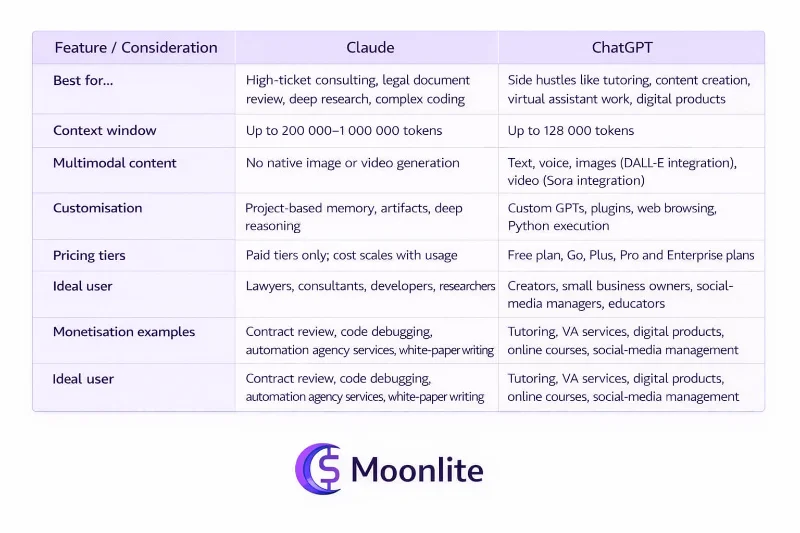
Claude vs ChatGPT: Key Differences in Earning Potential
When to Use Claude vs ChatGPT
Use Claude if:
You work on complex legal, technical or research documents that demand deep reasoning and a large context window.
You offer premium services like AI consulting, code auditing or enterprise research reports and need high confidence outputs.
You are building an
AI Automation Agency and need reliable workflows integrated with tools like n8n. See our comparison of n8n vs Zapier for automation insights.
Use ChatGPT if:
You’re starting a side hustle such as tutoring, virtual assistance or digital product creation and need an all round tool to generate ideas, drafts and scripts quickly.
You benefit from multimodal content creation like text, images and videos for social media,
YouTube or course materials.You want to build custom GPTs or integrate with web tools without coding.
Use both together for maximum earning potential. Many freelancers draft emails, proposals and outlines with ChatGPT and then rely on Claude for complex research, code review and final polishing. Combining the strengths of both tools creates a competitive edge.
Claude: Strengths and Limitations
What Claude Is Good At:
1. Handles Very Large Content
Can read huge documents in one go
Works well with:
Books
Contracts
Research papers
This is useful if your work involves long and complex information.
2. Strong Coding and Debugging
Writes clean and reliable code
Helps fix bugs quickly
Explains problems in simple ways
Great for developers and people building software.
3. Human-Like Writing Style
Produces natural and smooth writing
Keeps the same tone across long content
Good for:
Reports
Articles
Business writing
Helps you create professional content faster.
4. Project-Based Memory
Keeps work organized by project
Separates different client data
Stores documents and outputs clearly
Useful if you manage multiple clients or tasks.
What Claude Can’t Do Well
1. No Image or Video Generation
Cannot create:
Images
Videos
You need other tools for visual content
2. Fewer Integrations
Limited plugins and connections
Not as flexible as some other AI tools
May require extra tools for automation.
3. Sometimes Too Restrictive
May refuse certain requests
More cautious in responses
Can be frustrating in some use cases.
ChatGPT: Strengths and Limitations
What ChatGPT Is Good At:
1. Works With Different Types of Content
Can handle:
Text
Images
Voice
Video
This makes it useful for many tasks in one place.
2. Flexible With Tools and Plugins:
Has many plugins and integrations
Offers a custom GPT marketplace
Can be used for different workflows
This gives users more ways to build and automate tasks.
3. Fast and Well-Structured Responses
Gives quick answers
Organizes information clearly
Easy to read and understand
Helpful for everyday tasks and quick work.
4. Accessible Pricing
Has a free plan
Offers multiple pricing options
This makes it easy for beginners to start using it.
What ChatGPT Can’t Do As Well
1. Smaller Context Size
Can handle less text compared to some other tools
Works well for most tasks, but not very large documents
2. Writing Can Feel Generic
Sometimes uses common or repeated phrases
May lack uniqueness in some outputs
3. Occasional Mistakes
Can give incorrect or made-up information
Sometimes sounds too confident even when wrong
Frequently Asked Questions
Is Claude better than ChatGPT? It depends on the task. Claude is better for deep reasoning, long documents, nuanced writing and complex debugging. ChatGPT excels at multimodal content, speed, breadth of knowledge and plugin ecosystem.
Which AI has a bigger context window? Claude’s Sonnet models support around 200 K tokens, and the extended Opus model reaches up to one million tokens. ChatGPT’s latest models support up to 128 K tokens.
Which platform is more affordable? Both offer free tiers and cost around $20/month for individual pro plans. ChatGPT’s Pro tier ($200/month) offers unlimited usage, while Claude’s Max tier ($100–$200/month) multiplies usage limits.
Does Claude support images or voice? Not yet. Claude can analyse images but does not generate images or handle voice. ChatGPT generates images, processes voice and even produces videos through Sora.
Can I use both tools together? Absolutely. Many professionals use ChatGPT for fast ideation and prototyping, then Claude for refinement and deep analysis. Combining them often yields the best results.
Conclusion: Which AI Should You Choose?
Choosing between Claude and ChatGPT comes down to your workflow. If you work with massive documents, need robust debugging or value natural narrative flow, Claude is the best choice. Its extended context windows and precise reasoning make it ideal for writers, lawyers, researchers and developers.
If you need an all rounder for everyday tasks like brainstorming ideas, creating multimedia content, using specialised GPTs or performing quick research chatgpt is unbeatable. Its multimodal features and plugin ecosystem make it the Swiss army knife of AI assistants.
For most professionals, the smartest approach is to use both: harness ChatGPT’s speed and breadth to explore ideas, then rely on Claude’s depth for critical tasks. By combining their strengths, you’ll amplify your productivity and get the most from AI.
In addition to choosing the right assistant, consider exploring Moonlite Money’s Tools Directory to discover other AI applications. Our Education Hub including the pillar guide on How to make money with AI walks you through launching an AI powered business or side hustle.
For freelancers, our article on AI freelancing shows how to turn these tools into income. By learning how to choose the right AI assistant and by exploring business models and side hustles built around these tools you can tap into the future of work and create income streams that weren’t possible a few years ago.